Google Maps Lead Generation for Freelancers: Find International Clients
Published on September 21, 2026

Maninder Kaur
Freelance Growth Writer · LinkedIn
If you are an Indian freelancer looking for clients in the USA and you do not know where to start, you are not alone. Skills, a decent portfolio, and even years of experience still leave many people waiting for regular projects. The problem is often the channel, not the work.
Most freelancers hunt on Upwork, Fiverr, LinkedIn, or Instagram. Those platforms can work, and they should stay in your mix. The channel many people skip is simpler: Google Maps. It is public, searchable by city, and full of small businesses that already want more customers.
Quick Answer
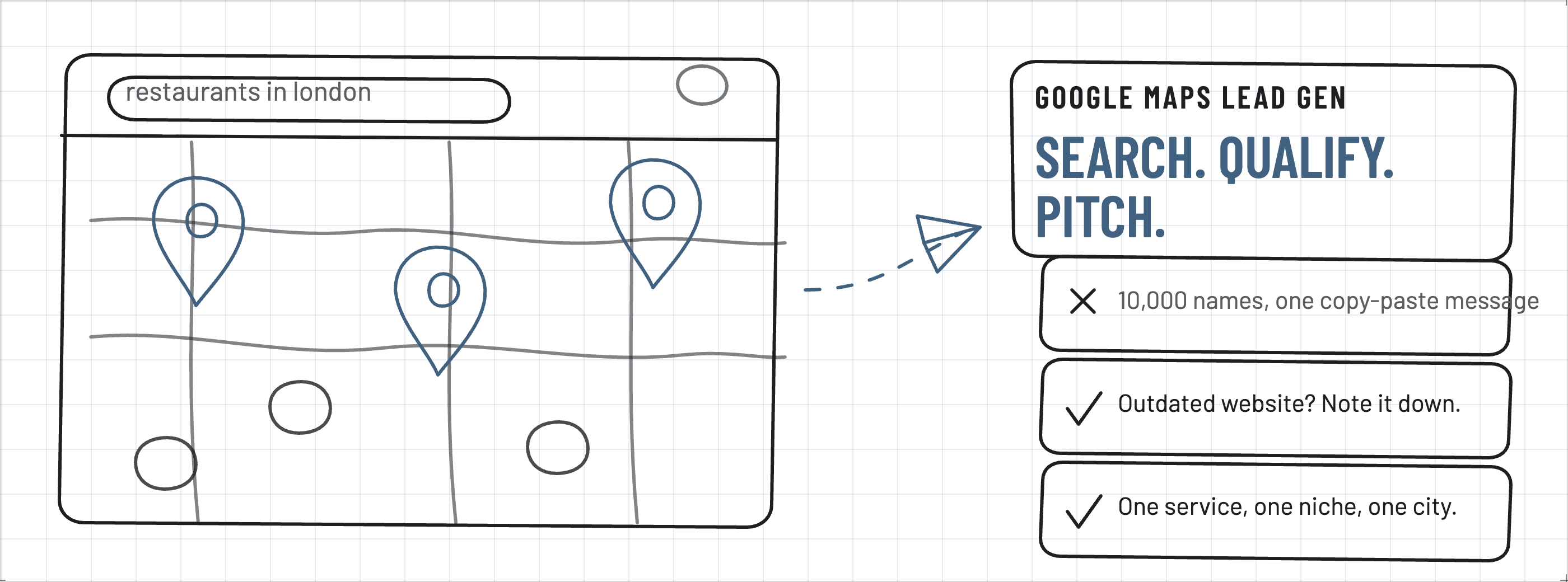
Google Maps lead generation is using map search to find local businesses, spotting a gap in their website or online presence, and sending a short personalized note. Start with one service, one niche, and one city. Qualify before you write. Do not scrape 10,000 names and paste the same pitch.
Key takeaways
- Search a category plus a city, then inspect websites, profiles, and social pages.
- Keep only businesses with a problem you can actually solve.
- Personalize every first message around that one observation.
- Use a two-hour daily loop: find, qualify, send, follow up.
- Respect public-data rules and make it easy to opt out.
What Is Google Maps Lead Generation?
Google Maps is not only for directions and restaurant nights. Used with a plan, it is a directory of businesses that already tell you their name, category, location, website, phone number, hours, and reviews. Google Maps lead generation means using those listings to identify owners you can help.
If you design websites, search dentists in New York, cafes in Toronto, plumbers in London, real estate agents in Dubai, or salons in Dubai. Maps returns a list. Your job is not to message every pin. Your job is to study the businesses and keep the ones with an outdated website, thin online presence, weak social activity, missing information, or another gap your service fixes.
That changes the conversation. You are no longer targeting blindly. You have a reason to write: a mobile site that breaks, a Google Business Profile with no photos, or a cafe that has not posted in months. Productive owners already know that gaps exist. A specific observation is easier to answer than a generic “I offer web design.”
This is the same idea as intentional prospecting in how to get international clients as a freelancer: pick a buyer, research them, then share one useful note instead of spraying a pitch.
Why Google Maps Can Be Useful for Indian Freelancers
Remote work is the point of freelancing. You do not need to stand in the client's shop. You can sit with a laptop and still serve a dentist in Texas or a cafe owner in London. With the right research, you can invoice in USD, GBP, CAD, AUD, or AED instead of waiting only for local rupee work.
Small businesses are often the easiest first target. Many have money and time to spend, but no in-house marketer. They listed themselves on Maps because they want walk-ins and calls. If their website looks ten years old, or their profile has three photos and one review from 2019, they already feel the gap. You can name it and offer a fix.
Maps also cuts through marketplace noise. On Upwork you compete with dozens of proposals on the same job. On Maps, the owner is not shopping a brief. You are bringing a problem they may not have written down yet. That is slower than bidding, and it is also less crowded.
If SEO is the offer you want to sell to those listings, the packaging in the SEO agency 70 lakhs case study is a useful reminder: one small, named service is easier to buy than a vague “full digital marketing” dump.
Which Freelancers Should Use This
Maps works when your service shows up on a public listing. Web designers see broken or missing sites. SEO specialists see thin profiles and weak local ranking. Social media managers see empty or abandoned pages. Graphic designers see messy logos and no brand photos. Developers see contact forms that fail. Video editors see businesses with zero video. Content writers see empty blog pages. Digital marketers see ads running to a site that cannot convert.
It is weaker if your offer has no visible signal. Highly technical B2B software, internal ops consulting, or products that never appear on a storefront listing are harder to qualify from a map pin. In those cases, LinkedIn and niche communities still matter more.
Start with businesses that already talk to consumers: clinics, salons, trades, restaurants, gyms, real estate offices, law firms, and local retailers. They live and die by local search. They also answer the phone.
How to Find Leads on Google Maps
Follow a structure. Choose one service and one type of business. Example: you want restaurants in London, you will study their online presence, and you will offer a website or booking-flow fix only if they lack it.
Open Google Maps and search “restaurants in London” or “cafes in London.” In a moment you get a list. That list is the raw pipeline. Do not drown in it. Open listings one by one. Click the website. Check Instagram or Facebook if it is linked. Note the public phone and email if they are shown. Save what you need in a Google Sheet or Excel file.
Useful search patterns look like this:
- dentists in Austin
- roofers in Manchester
- yoga studios in Dubai Marina
- independent cafes in Toronto
- family law firms in Melbourne
Pair the category with a city small enough that you can actually review the first 20–40 results. A global search for “restaurants” is noise. “Cafes in Shoreditch” is a list you can finish in a sitting.
Also note what Maps already tells you: rating, review count, hours, and whether the profile looks maintained. A 4.8 with 800 reviews and a sharp site is a harder sell. A 3.9 with 12 reviews and a Flash-era homepage is a conversation.
Do Not Just Collect Thousands of Businesses
This is where beginners stall. They get greedy with data. Lead generation is not 10,000 names and one copy-paste message. That approach is old, noisy, and it trains you to ignore the actual job: finding a business with a problem you can solve.
Research each row before you reach out. If you design websites and the site looks broken on a phone, write that down. If you manage social and they have not posted in months, write that down. If you do SEO and they barely appear for their own brand plus city, check the content and decide whether you can help.
The lead needs a reason to listen. That reason is the win. Without it you are another stranger asking for work.
A simple sheet is enough. Columns that actually get used:
- Business name and city
- Category and Maps URL
- Website and public email or form URL
- Public phone
- The specific gap you noticed, in one sentence
- Date contacted, follow-up date, response, status
Status values such as “qualified,” “emailed,” “called,” “waiting,” “not a fit,” and “won” stop you from double-contacting the same owner. They also show whether your niche is dead or your message is weak.
If you later pick up the phone, pair that sheet with a real calling workflow. The cold calling US clients from India guide covers numbers, timing, and follow-up so the Maps research does not die in an unread inbox.
How to Contact the Business
Finding the prospect is half the work. Contact is the part people rush. Stay professional. If they published an email, send a short note. If they prefer a contact form, use the form. Do not need a novel. Need a clear observation and a next step.
A first email can look like this:
Subject: Quick suggestion for [Business name]
Hi [First name],
I came across [Business name] while searching for cafes in London. I noticed [one specific issue on the website or Google profile]. I work with similar businesses on [your service], and I think there is a straightforward way to improve that.
Happy to send two or three suggestions, with no obligation.
Regards,
[Your name]
Personalize every line that names their business and their issue. If you paste the same body to fifty cafes, reply rates drop and you look like a list. The reader should feel that you opened their site.
Phone still works for owners who live on Maps. Keep the first call as short as the email: who you are, the one thing you saw, and a question about whether they want a couple of notes. For US listings, a local-looking caller ID helps the phone get answered. If you call from India, get a US virtual number from India before you burn a week of research on unanswered +91 calls. Web designers who prefer a spoken script can adapt the openers in cold calling scripts for web design freelancers.
Check the clock before you dial. A London cafe at 9pm IST is still mid-afternoon there; a New York dentist at 11pm IST is closed. Use the best time to call US clients from India when the city is in the States.
Offer Something Useful Before You Talk Price
If you want the owner to take you seriously, do not open with a rate card. Give them a reason to reply. Every street-level business has a story they already tell in reviews and photos. Your job is to help them tell it more clearly to the people already searching Maps.
A portfolio of past logos is not always enough. Homework is. Read their reviews. See what customers praise and complain about. Look at two nearby competitors. Then your message can say “your rivals show lunch photos and online booking; your site still hides the menu” instead of “I build beautiful websites.”
Useful first gifts are small: three screenshot notes, a 60-second loom of the mobile homepage, a list of missing GBP fields, or a sample caption calendar. Do not give away a full rebuild for free. Give enough proof that you looked, then ask if they want a scoped next step.
Build a Simple Daily System
You do not need to spend the whole day on lead generation. Two focused hours is a complete loop:
- 30 minutes: find new businesses on Google Maps
- 30 minutes: research and qualify
- 30 minutes: personalize and send outreach
- 30 minutes: follow up previous leads and reply to anyone who answered
Done most weekdays, the sheet fills with real conversations instead of a graveyard of untouched URLs. Track the columns listed earlier so you never contact the same business twice by accident, and so you can see which city or niche actually replies.
Monday can be a new city. Tuesday can be follow-ups. Friday can be reviewing which messages got answers. The system is boring on purpose. Boring systems ship.
Keep Your Expectations Realistic
Google Maps will not queue clients at your door. You may contact 50 businesses and hear from a few. Some never reply. Some already have a freelancer. Some are not interested. Some will not pick up. That is normal.
The goal is a consistent queue, not a miracle week. Contact businesses regularly, improve the messages, follow up once or twice without nagging, and keep delivering good work to anyone who says yes. Opportunities compound when the loop stays on.
Many freelancers try this for three days, get silence, and quit. Three days is not a sample. Give a niche two or three weeks of the daily system before you declare the city dead. Then change the category, the offer, or the first sentence — not the entire idea of outbound.
The Biggest Mistake to Avoid
Do not treat Google Maps as a spam database. Lead generation and spam are not the same thing. Respect the business. Use publicly available information carefully. Follow practical marketing rules and applicable privacy laws in the country you are contacting. Give people an easy way to decline further contact, and honor it.
Your objective is a genuine conversation, not annoying hundreds of owners. If you plan to call US businesses, read whether it is legal to cold call US businesses from India before you build a dialing habit. Rules around consent, Do Not Call lists, and commercial calls are not optional extras.
Final Thoughts
Google Maps is a practical source of potential clients for Indian freelancers. You do not always have to wait for someone to find your Gig. You can research, identify a need, and introduce the service directly.
Whether you are a web designer, SEO specialist, graphic designer, video editor, content writer, social media manager, developer, or digital marketer, the listings are already there. The important part is not finding businesses. It is finding the right businesses, understanding the problem, and showing how your skill solves it.
Start with one service, one niche, and one location. Personalize outreach. Follow up professionally. Improve from the replies you get. For a freelancer tired of crowded platforms, that loop can build a steadier book of work than waiting on an algorithm.
About the Author
Maninder Kaur
Freelance Growth Writer
Maninder writes about freelance client acquisition for Indian independents who want international work without living on marketplace bids. This guide is the Google Maps process she recommends: one niche, one city, qualified listings, and personalized outreach.
Connect on LinkedIn →Frequently Asked Questions
What is Google Maps lead generation for freelancers?
Google Maps lead generation means searching a city and category, studying each listing, and contacting businesses whose website, reviews, or social presence show a problem you can solve. It is prospecting, not a list-buy.
Can Indian freelancers find US and UK clients on Google Maps?
Yes. Most local businesses listed on Google Maps buy remote services such as websites, SEO, ads, content, and design. You can research from India and sell to owners in the US, UK, Canada, Australia, or the UAE without being on site.
Is it better than Upwork or Fiverr for finding freelance clients?
It is a different channel, not a replacement. Marketplaces bring inbound buyers. Google Maps lets you pick a niche and city, then open a conversation around a specific gap. Use both so one algorithm cannot stall your pipeline.
How many Google Maps leads should a freelancer contact each day?
Quality beats volume. A practical start is 30 minutes of search, 30 minutes of qualification, 30 minutes of personalized messages, and 30 minutes of follow-up. That usually means a handful of researched businesses, not hundreds of copy-paste emails.
What should I look for when qualifying a Google Maps business?
Look for an outdated or missing website, poor mobile layout, thin Google Business Profile details, weak or inactive social pages, few reviews, or ranking that lags nearby competitors. Note one concrete observation before you write.
How do I contact a business I found on Google Maps?
Use the public email, contact form, or listed phone number. Keep the first message short, name the business, mention one specific issue, and offer a few suggestions rather than a price list. If you call, use a local-looking number and follow applicable marketing rules.
Is Google Maps outreach the same as spam?
No. Spam is bulk, identical, and hard to opt out of. Ethical lead generation uses publicly listed details, personalizes each note, respects privacy and marketing rules, and makes it easy to decline further contact.
Related Posts
Freelance growth
How to get international clients as a freelancer
Skill, proof, Fiverr, Upwork and LinkedIn before you rely on one channel.
Freelance growth
How this agency made 70 lakhs selling SEO services
A retainer playbook you can sell once a Maps lead says yes.
Outreach
How to cold call US clients from India
Turn qualified Maps listings into actual phone conversations.
Scripts
Cold calling scripts for web design freelancers
Openers built around a specific website problem, not a generic pitch.
Ready to call a Maps lead on a number they will actually answer? Visit Callzo.
When a Google Maps Lead Wants to Talk
Call from a dedicated US or Canadian number in your browser so the owner sees a local caller ID, not a random Indian mobile.
Try Callzo